AI Analytics
We build the semantic layer, plain-language answers and AI search on Snowflake, so teams and customers query the data directly and each answer shows its source.
We build self-service analytics and AI agents in and around Snowflake, for organizations whose data foundation is in place while people still search, reconcile numbers and build reports by hand. Cortex Agents and Snowflake CoWork answer plain-language questions over Semantic Views and the organization's documents, Streamlit in Snowflake apps cover the views people open daily, and the same answers reach Microsoft Teams and the products customers use, each with its SQL or source.
What AI analytics on Snowflake includes
The analytics layer is built natively on Snowflake, so the same access policies apply to each answer, for the people inside the business and for the customers who see it in a product.
- The semantic layer
Semantic Views encode your metrics, joins, and business terms, with synonyms and verified queries for the questions people ask most, so natural language questions return accurate, cited answers. Semantic View Autopilot drafts the first version in Snowsight, and Semantic Studio, connected to Git, keeps each change under version control, with Snowflake CoCo in the editor.
- Natural-language answers
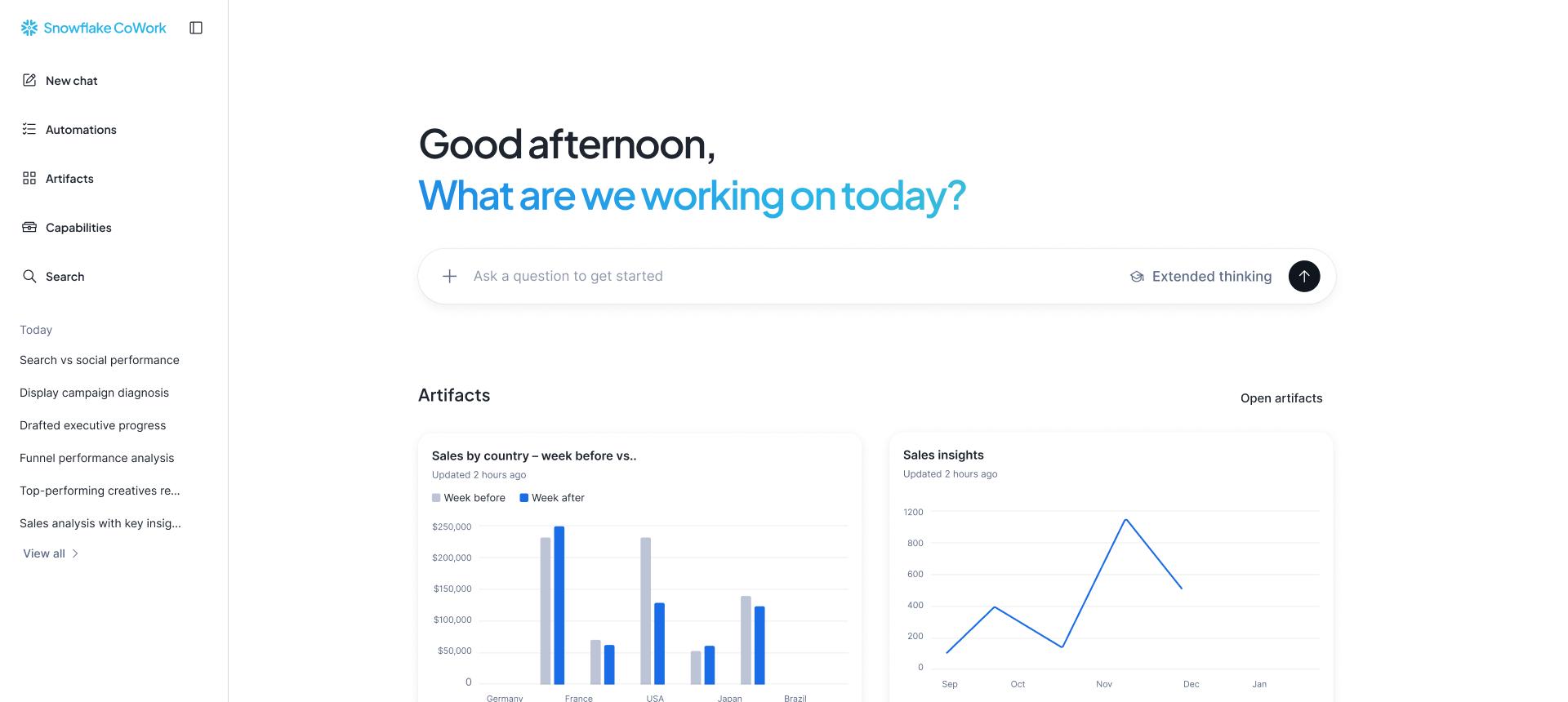
Cortex Agents plan across structured data and documents inside Snowflake, next to the data, and Cortex Analyst writes the SQL over the Semantic Views. Snowflake CoWork puts those agents in front of business users, who ask, follow up, and act in plain language: answers trace back to the data and queries behind them, Deep Research reports cite their sources claim by claim, and actions reach tools such as Slack, Jira and Salesforce through Model Context Protocol (MCP) connectors.
- AI search and RAG over documents
Cortex Search runs hybrid vector and keyword search over contracts, policies and other text, and keeps the index current as the documents change, so agents answer from the organization's own documents with the sources cited. Where files need to become rows, AI_PARSE_DOCUMENT and AI_EXTRACT turn them into tables the semantic layer can join, as in claims processing.
- Dashboards and data apps
Streamlit in Snowflake apps are the visualization layer, built where the data lives, and run with restricted caller's rights, so each viewer sees only what their own role allows. Retired Snowsight dashboards convert into Streamlit in Snowflake apps, and the build decides, dashboard by dashboard, whether to convert it, replace it with an agent, or retire it.
- Answers where work happens
Cortex Agents answer in Microsoft Teams and Microsoft 365 Copilot, in internal apps through the agent REST API, and to agents outside Snowflake through the Snowflake-managed MCP server, all on the same Semantic Views and roles.
- Customer-facing analytics
Dashboards, Streamlit in Snowflake apps, and Cortex answers inside a software product or a customer, distributor, or partner portal, in the product's own pages and theme. Each customer sees only its own rows: discovery picks shared tables under row access policies, an object per tenant, or an account per tenant, each agent request is pinned to one tenant, and query tags make the cost of each tenant measurable. Customers who run Snowflake can receive the same data products in their own account through Secure Data Sharing or a Snowflake Native App.
- AI governance and evaluations
Cortex Agent evaluations score answer correctness against the business's own questions before each wider rollout, and agents act under each person's roles, capped by a Restricted Session Scope. AI budgets and per-user quotas hold spend to the limits the business sets.
What it looks like in your stack
The work runs in your Snowflake account, repositories and CI, under your access controls, and the results reach the tools your people already use.
- The semantic layer
- Natural-language answers
- AI search and RAG over documents
How an analytics rollout runs
Engagements follow the same four steps. Each sprint delivers working software on your data, and each further commitment rests on what already runs in production.
- 01
Discovery
A short engagement that fixes scope and price and shows the current state of your data.
- 02
Use-case sprints
Each sprint delivers a working increment into your environment, one use case at a time.
- 03
Proof before scale
Each use case proves out in production before the next one is committed.
- 04
A practice you keep
Your team builds alongside ours, so the skills stay in-house.
Self-service analytics depends on the data underneath it. When pipelines need hardening first, our data engineering team does that work on the data foundation, and then the build moves into the analytics and agent layer. Openflow, Snowpipe Streaming and Zero-Copy Integrations bring in the ERP, CRM and HR data the answers draw on, from systems such as SAP, Salesforce and Workday.
Discovery picks one priority domain and the questions asked most about it, and drafts its first Semantic View. Use-case sprints turn that into working answers, one answer set at a time: the first sprint delivers the view with verified queries and a Cortex Agent over it in Snowflake CoWork or Microsoft Teams, with AI budgets set. Proof before scale means Cortex Agent evaluations against those questions, and your analysts' sign-off, before access widens. Definitions and agent configurations are documented in Git as they are built, and each metric has a named owner.
Customer-facing analytics follows the product roadmap. Discovery starts from the questions customers ask first and returns the serving route, the tenancy pattern, the expected cost per tenant, and a priced sprint plan. Sprints put working screens in front of design partners early, and proof before scale measures adoption and the cost per tenant in use before the feature reaches the whole customer base.
A defined build is priced to the outcome, and Snowflake stays consumption based: the agents draw AI Credits as people use them. Our pricing shows how scope and price are agreed up front. When an answer needs to become an action in the ERP or the CRM, agentic engineering takes it into daily operations, as our post on Snowflake as the control plane for the agentic enterprise explains.
A good first use case is a process with a measurable cost, in hours, errors, or days added to the close, and data the team can reach this quarter. That was our answer to the question we heard most at Snowflake World Tour Mexico City. Bring that process and the questions people ask about it, and talk to the team about a discovery built around them.
A nearshore team in your review sessions
Analytics and agent tuning runs on feedback. Someone asks a question, the answer comes back slightly off, an analyst explains why, and the definition is corrected. Both teams share the working day, so that loop closes inside it.
Our SnowPro-certified engineers work from Monterrey and Austin, on your hours, and sit in the same review sessions as your analysts and, for customer-facing work, your product managers and designers. They hear objections firsthand and work them into the Semantic Views and the agents inside the sprint. The full delivery model is on our nearshore page.
The build is documented as it goes, and your analysts learn the semantic model and the agent configurations as we build them. After go-live your team can run them, or Viewnear can run them as a managed service. The SKU catalog case study is an example from a packaging manufacturer in Mexico: a Snowflake CoWork agent, with Cortex Analyst answering over Semantic Views, that business users query in plain language. The construction data foundation we built for a construction and real-estate developer in Mexico has Snowflake CoWork agents over Semantic Views and Slack bots on the same data.
Questions teams ask before rolling out AI analytics
How accurate is Cortex Analyst?
As accurate as its semantic model. Cortex Analyst answers only through the Semantic Views it is given and shows the query behind each answer. Most of our implementation effort goes into that model: verified queries, business-term coverage, and review cycles with your analysts until the answers hold up. The Cortex Agent that calls it asks a clarifying question when a request is ambiguous, and before more people get access, Cortex Agent evaluations score answer correctness against the questions the business asks.
Do I need a semantic model for Cortex Analyst?
Yes. Text-to-SQL over raw schemas has to guess what "revenue" or "active customer" means. Semantic Views encode those definitions once, and Cortex Analyst, Cortex Agents, and Snowflake CoWork all answer through them. We draft the first version during discovery and refine it with your team each sprint. dbt builds and tests the tables underneath, the Semantic Views hold the business definitions the agents read, and both live under version control. For a commercial-vehicle dealer group in Mexico, Viewnear is building the golden records domain by domain, with per-domain Snowflake CoWork agents on top.
What is the difference between Cortex Analyst and Snowflake CoWork?
Cortex Analyst is the service that turns a natural language question into SQL over Semantic Views, built to be embedded in apps and workflows. Snowflake CoWork is the agent experience business users open directly to explore data and act on it. Cortex Agents connects the two: an agent calls Cortex Analyst for structured data and Cortex Search for documents, Snowflake CoWork runs on those agents, and Snowflake now recommends Cortex Agents for new builds. A build can include all three: Snowflake CoWork for people, Cortex Agents wherever answers need to appear inside a product or process, and existing Cortex Analyst apps kept running as they are.
What happens to our Snowsight dashboards and existing BI tools?
Snowflake retired Snowsight Dashboards in 2026, and its Generate Streamlit app option converts each saved dashboard into a Streamlit in Snowflake app. The build sorts them: views worth keeping become Streamlit in Snowflake apps, recurring questions move to Snowflake CoWork, where a saved Artifact keeps a chart live under each teammate's own permissions, and the rest retire. The business intelligence tools teams already use keep running after a move to Snowflake, with Snowflake as the source they query. Semantic Views answer standard SQL, so those tools read the same metrics as the agents. Where per-person rows matter, we connect each tool so it signs in as the person using it, and row access policies follow that person.
How do I add analytics to my SaaS product?
Start where the data already lives. If your product data is in Snowflake, embedding analytics from there keeps the data, its security model, and access grants in one place. Then model the data for multi-tenant access, pick the serving pattern (embedded dashboards, Streamlit in Snowflake apps, or APIs into your own front end), and release one high-value view to design partners before rolling it out to all customers. A Streamlit in Snowflake app loads inside the product's own pages through an iframe and a short-lived embed link, and Cortex Agents, called through their REST API, let customers ask and act inside the app.
How do tenant isolation and row-level security work on Snowflake?
Each customer sees only their own rows, and Snowflake enforces that on each query. On Snowflake Enterprise Edition, row-level security runs through row access policies that filter shared tables by tenant, and tenants that need stronger separation get their own objects or account. Embedded apps run as the signed-in viewer, Cortex Agents receive the tenant as an immutable session attribute, and Cortex Search queries carry a tenant filter. Each policy is tested on its own before the first tenant goes live, and our security and trust page covers the controls around them.
What do Cortex Agents and Snowflake CoWork cost to run?
Snowflake bills these two artificial intelligence features on consumption, in AI Credits: Cortex Agents and Snowflake CoWork are charged for the tokens they process, the cost adds up across the tools an agent calls, and the SQL behind each answer runs on standard warehouse compute. Sprint one sets AI budgets by team or cost center, plus per-user quotas that block new AI requests at the limit, and resource monitors cap the warehouses. In a customer-facing product, each tenant's queries carry a query tag, so the product team prices the analytics tier on the measured cost per customer.
Do the agents respect our security, and can we show an auditor where a number came from?
Yes. Agents act under the asking person's Snowflake roles, so role-based access, row access policies and masking apply to each answer, and a Restricted Session Scope can hold an agent below what those roles allow. Answers carry the SQL or source documents behind them, lineage runs from each table through the Semantic View to the agent, and AI Agent Identity records who authorized each access and which agent carried it out. The models run inside Snowflake's service perimeter, stored data stays in the account's region, and cross-region routing is set to match residency rules.

Work already in production
Each case study sets out the problem, what we built and the numbers, for clients across the USA and LATAM.
Read the case studiesTalk to the people who would build it
Thirty minutes with someone who would own the work, and a straight answer on whether we are the right fit.